
Disclaimer: All client details, company names, network addresses, device names, and findings in this article are entirely fictional and created for illustrative purposes only. This case study is intended to demonstrate what a professional wireless security assessment involves.
Background
Crestfield Healthcare Group is a fictional Irish private healthcare provider operating three outpatient clinics — in Dublin city centre, Sandyford, and Cork. Across its 120 staff, Crestfield offers GP services, specialist consultations, diagnostic imaging, and minor procedures. Its network infrastructure holds some of the most sensitive data a business can carry: patient health records, diagnostic imaging files, referral correspondence, and prescription histories — all of which fall under GDPR Article 9 special category data, carrying the highest level of data protection obligation under Irish and EU law.
Crestfield’s IT environment had been built incrementally across three sites over several years, maintained by an external managed service provider. Each clinic had its own wireless infrastructure, a mix of modern Cisco Meraki access points at the Dublin and Sandyford sites and older Netgear hardware at the Cork location. A guest Wi-Fi network was available in each waiting room, with the password printed on a card at reception for patients and visitors.
The engagement came about following a board-level review of cyber risk prompted by a wave of ransomware incidents targeting healthcare providers across Europe. The board wanted assurance that their wireless networks — which they regarded as a lower-risk surface compared to their internet-facing systems — were properly secured. As this assessment would demonstrate, that assumption was significantly misplaced.
What Is a Wireless Security Assessment?
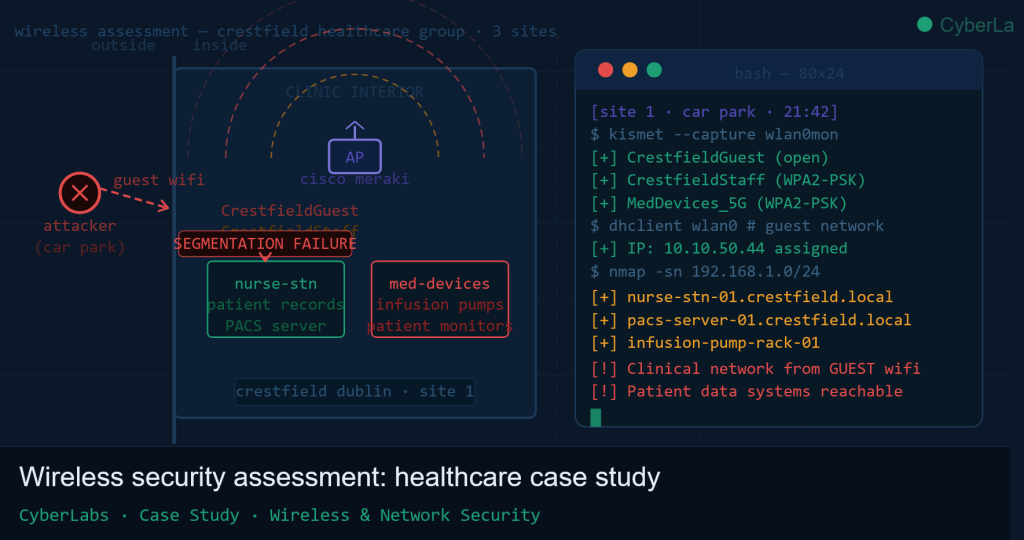
A wireless security assessment tests the security of an organisation’s Wi-Fi networks from the perspective of an attacker who is physically near the building — in a car park, a waiting room, or an adjacent street. It examines whether wireless networks are properly isolated from each other, whether the encryption in use can be broken, whether unauthorised access points have been introduced, and whether an attacker connecting to a guest or public network can reach systems they should not be able to.
Unlike most cyber attacks, which originate from the internet, a wireless attack requires physical proximity — typically within 50 to 100 metres, or further with a directional antenna. This makes it a realistic threat model for any organisation in a shared building, on a busy street, or with a public-facing waiting area.
Scope & Rules of Engagement
CyberLabs conducted the assessment across all three Crestfield sites over four days, with one to two days allocated per location. Agreed scope included:
- All wireless SSIDs (network names) broadcast at each site
- Wireless network segmentation and inter-VLAN routing
- Authentication mechanisms on all wireless networks
- Rogue and unauthorised access point detection
- Physical signal propagation — how far each network extended beyond the building
As with all CyberLabs engagements, testing was conducted under a signed authorisation document. No patient data was accessed at any point during the assessment. Where internal systems were discovered to be reachable from guest or staff networks, access was limited to confirming connectivity and identifying the device type — findings were recorded and testing stopped at that point, consistent with the rules of engagement.
Methodology
Wireless security assessments follow a structured flow from passive observation through to controlled exploitation. CyberLabs uses a combination of purpose-built wireless testing hardware — including high-gain USB wireless adapters capable of operating in monitor mode — and standard industry tooling including Kismet, Aircrack-ng, hcxdumptool, and Wireshark.
The assessment phases were:
- Passive reconnaissance — discover all wireless networks in the vicinity without transmitting
- Network enumeration — map SSIDs, access points, authentication types, signal range, and connected clients
- Segmentation testing — assess whether networks are properly isolated from each other
- Authentication testing — assess the strength of the encryption and credentials protecting each network
- Rogue device assessment — test whether unauthorised access points would be detected
Phase 1 — Passive Wireless Reconnaissance
Testing at the Dublin site began from the clinic car park at 21:30, after the building had closed for the evening. With a laptop running Kismet in passive mode — meaning no traffic was transmitted, only received — CyberLabs mapped every wireless network visible from the car park within minutes.
Four distinct SSIDs were identified at the Dublin site alone:
CrestfieldGuest— the patient-facing guest network, open authentication with a web-based captive portalCrestfieldStaff— the staff wireless network, protected with WPA2-Personal (a shared password)MedDevices_5G— a dedicated network for networked medical equipment, WPA2-PersonalCrestfieldMgmt_hidden— a hidden SSID used for access point management, detectable despite not broadcasting its name because connected devices periodically advertise it in their probe requests
All four SSIDs were clearly visible from the car park. The guest and staff networks had strong enough signal to be usable from across the street. This signal propagation is not inherently a vulnerability, but it does mean that any weaknesses in these networks are exploitable without entering the building.
Phase 2 — Guest Network Assessment
CyberLabs connected to CrestfieldGuest using the password from the reception card. Upon connection, a captive portal page loaded — a login screen requiring acceptance of terms and conditions before internet access was granted.
Captive portals are a common feature of guest Wi-Fi systems and are intended to control internet access. What they do not do is provide network-level isolation. The captive portal in this case was implemented at the application layer — it only restricted web browsing. At the network layer, the guest device had been assigned an IP address in the 10.10.50.0/24 subnet and was already fully connected to the network.
CyberLabs ran a basic network scan before accepting the captive portal terms — that is, while technically not yet permitted to browse the internet. The scan was targeting whether other network subnets were reachable, not the internet. The results were immediate and significant.
$ nmap -sn 192.168.1.0/24
Starting Nmap scan from 10.10.50.44 (CrestfieldGuest)...

192.168.1.1   — gateway (clinical network router)
192.168.1.15  — nurse-stn-01.crestfield.local
192.168.1.16  — nurse-stn-02.crestfield.local
192.168.1.22  — patient-monitor-02.crestfield.local
192.168.1.28  — infusion-pump-rack-01.crestfield.local
192.168.1.30  — pacs-server-01.crestfield.local
192.168.1.35  — reception-pc-01.crestfield.local

7 hosts up on the clinical network — reachable from the guest subnet.
The guest Wi-Fi network, intended exclusively for patients waiting to be seen, had direct layer 3 routing access to Crestfield’s internal clinical network. No firewall rule, no network access control policy, and no VLAN segmentation was in place to prevent this.
Phase 3 — The Critical Finding: Internal Systems Reachable from the Waiting Room
To understand the significance of what was found, it helps to know what each of those systems does:
- nurse-stn-01 / nurse-stn-02: Windows 10 terminals used by clinical staff to access the patient record system, view appointment histories, and update consultation notes
- patient-monitor-02: A networked Philips patient monitoring unit with a web-based management interface used for remote configuration
- infusion-pump-rack-01: A networked Baxter infusion pump controller — the device that manages intravenous medication delivery rates for patients undergoing treatment
- pacs-server-01: The Picture Archiving and Communication System server, which stores and serves all diagnostic imaging — X-rays, MRI scans, and ultrasounds — in the DICOM format
- reception-pc-01: The reception desk computer, used for appointment booking, check-in, and patient identity verification
CyberLabs confirmed connectivity to each of these hosts and identified open management ports, including web interfaces on both the patient monitor and the infusion pump controller — both of which loaded without authentication prompts. The content of those interfaces was recorded as evidence without any further interaction.
An attacker with a laptop and the guest Wi-Fi password — information that is, by design, publicly available at reception — could have sat in the waiting room or the car park and had network-level access to patient record terminals, diagnostic imaging, and networked medical devices. In a worst-case scenario involving a motivated attacker, the same path that allowed CyberLabs to reach the infusion pump interface could theoretically be used to attempt unauthorised changes to device configuration.
This finding was escalated to Crestfield’s IT provider and management on the same evening it was discovered, before testing continued.
Phase 4 — Staff Network: WPA2-Personal Pre-Shared Key Attack
The CrestfieldStaff network used WPA2-Personal — a common wireless security standard that protects the network with a single shared password known to all staff. While WPA2-Personal provides encrypted transmission, it has a well-known weakness: an attacker who can capture certain authentication traffic can attempt to crack the password offline, at their own pace, without any interaction with the network.
CyberLabs used a modern technique called a PMKID attack, first published in 2018 by the developer of the Hashcat password cracking tool. Unlike older methods that required waiting for a staff device to connect to the network, the PMKID attack extracts a crackable value directly from the access point itself — no connected client devices required. The entire capture took under two minutes from the car park.
$ hcxdumptool -i wlan0 -o capture.pcapng --enable_status=1
[+] PMKID captured from CrestfieldStaff AP (00:1A:2B:3C:4D:5E)

$ hcxtools pcapng2hash capture.pcapng > hash.22000

$ hashcat -m 22000 hash.22000 /usr/share/wordlists/rockyou.txt \
  --rules-file /usr/share/hashcat/rules/best64.rule

[+] Cracked: Crestfield2022!
The staff network password — Crestfield2022! — was cracked in 43 minutes. It is a textbook example of a weak pre-shared key: the organisation name, a year, and a special character. This pattern appears in every major password cracking wordlist. Once cracked, CyberLabs confirmed that the staff network provided access to the same internal clinical systems as the guest network, and additionally to internal file shares and administrative interfaces not reachable from the guest VLAN.
A further concern with WPA2-Personal is session isolation: because all users share the same key, there is no per-device authentication. A staff member who leaves the organisation retains the ability to connect to the network unless the password is changed for all users — an operationally disruptive process that most organisations simply do not perform.
Phase 5 — Rogue Access Point Detection
As a final test at each site, CyberLabs deployed a rogue access point — a device configured to broadcast the same SSID as the legitimate CrestfieldStaff network with a stronger signal, to test whether Crestfield’s infrastructure would detect and alert on its presence.
At the Dublin and Sandyford sites, running Cisco Meraki hardware, the Meraki dashboard has built-in Wireless Intrusion Detection System (WIDS) capability — but it had not been enabled. At the Cork site, running older Netgear hardware, no such capability existed at all.
The rogue access point operated undetected for the duration of the test window. During that window, two staff devices automatically connected to it — their wireless settings had remembered the SSID and connected to the strongest signal without prompting the user. This is standard behaviour for most devices, and it is why a rogue access point broadcasting a familiar network name is such an effective attack.
Had this been a real attack, those devices would have transmitted all unencrypted traffic — and potentially authenticated traffic — to a system under the attacker’s control.
Patient Data & Regulatory Impact
Patient health information is classified as special category data under GDPR Article 9, meaning it carries a higher standard of protection than ordinary personal data. A breach involving patient records — even access without exfiltration — is notifiable to the Data Protection Commission under Article 33 if it is likely to result in a risk to individuals’ rights and freedoms.
The reachability of the PACS server and patient record terminals from the guest network, combined with the absence of authentication on medical device management interfaces, meant that Crestfield was one opportunistic attacker away from a notifiable breach. The organisation’s NIS2 obligations as a healthcare provider in the essential entities category further reinforced the urgency of remediation.
As a practical matter, the ransomware risk was also significant. The guest-to-internal routing path provided a direct lateral movement route: an attacker who gained a foothold via the guest network could propagate ransomware to clinical systems, potentially disrupting patient care across all three sites.
Findings Summary
| Ref | Finding | Risk Rating |
|---|---|---|
| WIFI-01 | Guest SSID has unrestricted layer 3 routing access to clinical network — nurse stations, PACS, medical devices all reachable | 🔴 Critical |
| WIFI-02 | Networked medical devices (patient monitor, infusion pump) accessible from guest network with no authentication on management interfaces | 🔴 Critical |
| WIFI-03 | WPA2-Personal PSK on staff network cracked in under 1 hour via PMKID attack — password Crestfield2022! | 🟠 High |
| WIFI-04 | No per-user authentication on staff wireless — WPA2-Personal provides no individual accountability or access revocation capability | 🟠 High |
| WIFI-05 | Wireless Intrusion Detection System (WIDS) not enabled — rogue access point operated undetected, two staff devices auto-connected | 🟠 High |
| WIFI-06 | Default credentials on management interfaces of networked medical devices | 🟠 High |
| WIFI-07 | Hidden SSID (CrestfieldMgmt_hidden) discoverable via passive scan — security through obscurity provides no protection | 🟡 Medium |
| WIFI-08 | Guest captive portal served over HTTP — credentials and session tokens transmitted in plaintext | 🟡 Medium |
| WIFI-09 | Medical device SSID (MedDevices_5G) uses same WPA2-Personal model as staff network — PSK shared across clinical and admin staff | 🟡 Medium |
| WIFI-10 | Wireless signal propagation extends well beyond building perimeter at all three sites — attack feasible from public areas | 🟡 Medium |
| WIFI-11 | Cork site access points running firmware version with known CVEs — no vendor patch applied | 🟢 Low |
| WIFI-12 | No documented wireless acceptable use policy or staff awareness of rogue AP risk | 🟢 Low |
Remediation Recommendations
Immediate (within 48 hours)
- Isolate the guest network at the firewall level — implement an explicit deny rule between the guest VLAN (
10.10.50.0/24) and the clinical network (192.168.1.0/24). Guest traffic should only be permitted to reach the internet via a dedicated breakout, with no routing to any internal subnet. This is the single most impactful change and should be treated as an emergency fix - Disable or place medical device management interfaces behind authentication — no web-based management interface on a networked medical device should be accessible without credentials. Engage device vendors for guidance on enabling authentication if the default configuration does not require it
- Change the CrestfieldStaff Wi-Fi password immediately — the current PSK is cracked and must be treated as compromised. Replace with a randomly generated password of at least 20 characters and distribute securely to staff. Plan a migration to WPA2-Enterprise (see below) to avoid repeating this remediation cycle
Short Term (within 30 days)
- Migrate staff wireless to WPA2-Enterprise with 802.1X authentication — rather than a single shared password, WPA2-Enterprise issues each staff member individual credentials (typically their domain login via a RADIUS server). This provides per-user authentication, full audit trails, and the ability to instantly revoke access for a specific individual without changing anything for anyone else. Cisco Meraki supports this natively and the configuration effort is modest
- Enable WIDS on Cisco Meraki access points — the Meraki dashboard includes a rogue AP detection and alerting feature that requires only a configuration change to enable. This should be turned on at the Dublin and Sandyford sites immediately. Consider replacing the Cork Netgear hardware with Meraki to standardise across all three sites and gain the same capability
- Place medical devices on an isolated VLAN — the
MedDevices_5Gnetwork and the devices it connects to should be on a dedicated VLAN with strict firewall rules permitting only the specific traffic those devices require (typically communication with a clinical workstation or management server). They should have no general internet access and no access to administrative systems
Medium Term (30–90 days)
- Migrate the Cork site to Cisco Meraki hardware — standardising on a single vendor across all three sites dramatically simplifies ongoing management, ensures consistent security policy application, and eliminates the firmware vulnerability exposure on the legacy Netgear equipment
- Serve the guest captive portal over HTTPS — this is a straightforward configuration change that prevents credentials and session data from being transmitted in plaintext over the guest network, which is by definition an untrusted environment
- Conduct staff awareness training on wireless risks — specifically, the risk of auto-connecting to rogue access points. Staff should understand that their devices will connect to any remembered network name automatically, and should configure their devices to require confirmation before connecting to known networks in unfamiliar locations
- Review signal propagation and consider directional antennas — where signal strength extends significantly beyond the building perimeter, directional or lower-gain antennas can reduce the attack surface without affecting internal coverage
Outcome
Crestfield’s IT provider implemented emergency VLAN isolation for the guest network within 24 hours of receiving the critical finding notification, and disabled external access to medical device management interfaces across all three sites within 48 hours. These two actions addressed the immediate patient safety and data breach risk.
At the follow-up assessment six weeks later, WIDS had been enabled on the Meraki sites, the staff network had been migrated to WPA2-Enterprise at the Dublin and Sandyford locations, and the Cork site hardware replacement was underway. None of the critical or high-severity findings from the original assessment were reproducible.
Crestfield’s board received a formal remediation summary, which was also shared with their cyber insurance provider and used to demonstrate proactive risk management in their next HIQA governance review.
The managing director noted after the engagement that the finding most difficult to communicate to the board was not the technical detail — it was the simplicity of the attack. The guest Wi-Fi password was on a card at reception. Anyone with a laptop could have sat in the waiting room, connected to the same network as a patient waiting for an appointment, and had direct access to the clinical systems behind it. No hacking required in any meaningful sense of the word.
Is Your Wireless Network Properly Segmented?
Wireless security assessments are relevant to almost every organisation with a physical premises — clinics, offices, hotels, retail locations, and warehouses. The question is never whether Wi-Fi is in use; it almost always is. The question is whether the networks that serve visitors, staff, and operational equipment are properly isolated from each other, and whether the credentials protecting them can withstand a determined attacker sitting in a car park.
CyberLabs conducts wireless security assessments as standalone engagements or as part of a broader internal or external infrastructure test. Assessments can cover single sites or multiple locations. Get in touch to discuss scope and arrange a consultation.
CyberLabs is a Dublin-based penetration testing and offensive security firm. We help Irish organisations identify and fix security vulnerabilities before attackers can exploit them. All testing is conducted under signed rules of engagement and in full compliance with Irish and EU law.