
TL;DR:
Gobuster’s dir mode fires wordlist-based HTTP requests to uncover hidden paths on a web server. Install it, point it at an authorised target, pick a wordlist, tune threads and extensions, and read the results by status code. That’s it. Well – mostly. Read on.
1. Introduction
Picture a developer at 11pm on a Friday, rushing a hotfix to production. The admin panel? Still there. The backup config file they meant to delete? Also still there. The staging login page with the password admin123? Especially still there. They just didn’t bother linking to any of it from the main site, which apparently counts as security in some circles.
Directory enumeration is how we find all of that. Gobuster is the tool that does the heavy lifting – a fast, Go-based command-line utility that brute-forces URL paths by firing HTTP requests for every entry in a wordlist. No link-crawling, no JavaScript rendering, no nonsense. Just raw requests, fast results, and a healthy number of things you probably weren’t supposed to find.
This guide covers gobuster dir from installation through output analysis. All examples assume you’re testing against a target you own or have explicit written permission to test. Seriously – unauthorised scanning is illegal and not what we’re about here.
2. Tools Required
| Tool | Version | Notes |
|---|---|---|
| Gobuster | 3.6+ | Run gobuster -V to confirm |
| Go (optional) | 1.21+ | Only needed if building from source |
| SecLists | Latest | Wordlist collection – install via apt or clone from GitHub |
| DVWA / HackTheBox / authorised lab | – | Your practice target |
Install Gobuster on Kali/Debian:
sudo apt update && sudo apt install gobuster -y
gobuster -V
Install SecLists:
sudo apt install seclists -y
# Wordlists land at /usr/share/seclists/
Or clone directly from GitHub:
git clone https://github.com/danielmiessler/SecLists.git ~/SecLists3. Step-by-Step
Step 1 – Verify the target is reachable
Before launching a scan, confirm the target is actually responding:
curl -I http://TARGET_IP/A 200 or 302 means the server is up. A timeout or ERR_CONNECTION_REFUSED means it’s down, unreachable, or has already decided it doesn’t like you. Resolve connectivity first – there’s no point scanning a wall.
Step 2 – Run a basic directory scan
The minimum viable Gobuster command:
gobuster dir -u http://TARGET_IP -w /usr/share/seclists/Discovery/Web-Content/common.txtFlag breakdown:
| Flag | Purpose |
|---|---|
-u | Target URL |
-w | Path to your wordlist |
Gobuster prints each discovered path with its HTTP status code in real time. At this stage you’re casting a wide net – common.txt is quick and catches the obvious stuff.
Step 3 – Add extension fuzzing
Directories are only half the story. Interesting files – backups, configs, leftover scripts – won’t show up unless you tell Gobuster what extensions to look for. Use -x:
gobuster dir \
  -u http://TARGET_IP \
  -w /usr/share/seclists/Discovery/Web-Content/raft-medium-directories.txt \
  -x php,bak,txt,config
Keep in mind that -x multiplies your request count. A 20,000-word list with four extensions becomes 80,000+ requests. That’s fine – just factor it into your thread count and timing.
Match extensions to the technology stack. PHP apps get .php,.php7; IIS gets .asp,.aspx; Java gets .jsp. Spraying .php at an ASP.NET app is just noise.
Step 4 – Tune thread count
The default is 10 threads, which is conservative. On a stable lab environment you can push it higher:
gobuster dir \
  -u http://TARGET_IP \
  -w /usr/share/seclists/Discovery/Web-Content/raft-medium-directories.txt \
  -x php,bak,txt,config \
  -t 50
A sensible range is 25–50 for lab environments. On anything production-adjacent (even with permission), keep it at 10–20. Hammering a fragile app with 100 threads is a good way to take it offline and have an awkward conversation with the client.
Step 5 – Save output to a file
Always log your results. Terminals close, SSH sessions drop, and you will not remember that db.config you spotted 45 minutes ago:
gobuster dir \
  -u http://TARGET_IP \
  -w /usr/share/seclists/Discovery/Web-Content/raft-medium-directories.txt \
  -x php,bak,txt,config \
  -t 50 \
  -o gobuster-results.txt
The -o flag writes everything to a file for later analysis and reporting. Use it every time, without exception.
Step 6 – Suppress noise (optional)
Behind a WAF or load balancer, you may see the server throwing back non-standard codes for almost every request, which pollutes your results. Filter them out with -b:
gobuster dir \
  -u http://TARGET_IP \
  -w /usr/share/seclists/Discovery/Web-Content/raft-medium-directories.txt \
  -x php,bak,txt,config \
  -t 50 \
  -b 404,400 \
  -o gobuster-results.txt
Use -b carefully. Blacklisting 403 will hide access-controlled paths – those are still worth recording even if you can’t access them yet. They may become accessible through authentication bypass or after privilege escalation.
4. Example Output
===============================================================
Gobuster v3.6
by OJ Reeves (@TheColonial) & Christian Mehlmauer (@firefart)
===============================================================
[+] Url:                     http://192.168.1.50
[+] Method:                  GET
[+] Threads:                 50
[+] Wordlist:                /usr/share/seclists/Discovery/Web-Content/raft-medium-directories.txt
[+] Extensions:              php,bak,txt,config
[+] Status codes:            200,204,301,302,307,401,403
[+] Output File:             gobuster-results.txt
===============================================================
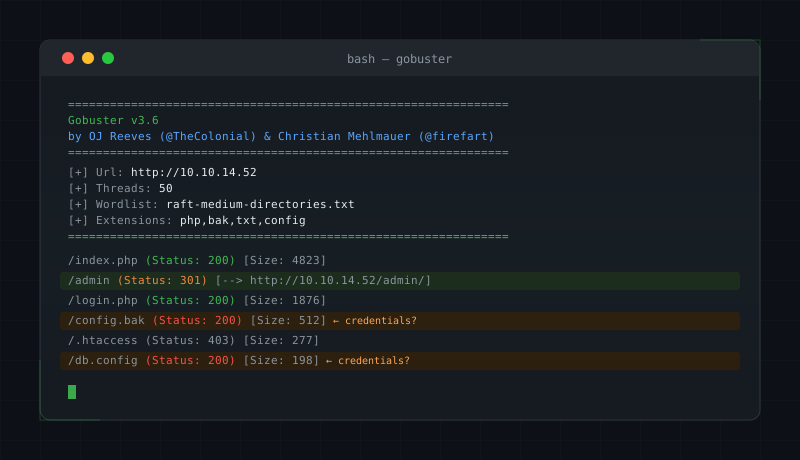
/index.php            (Status: 200) [Size: 4823]
/admin                (Status: 301) [Size: 312]  [--> http://192.168.1.50/admin/]
/login.php            (Status: 200) [Size: 1876]
/config.bak           (Status: 200) [Size: 512]
/uploads              (Status: 301) [Size: 318]  [--> http://192.168.1.50/uploads/]
/.htaccess            (Status: 403) [Size: 277]
/db.config            (Status: 200) [Size: 198]
Status code quick reference:
| Code | Meaning | What to do |
|---|---|---|
200 | Found and accessible | Investigate immediately |
301/302 | Redirect | Follow the redirect path |
403 | Forbidden — exists but blocked | Note it; worth revisiting with auth bypass |
404 | Not found | Ignore (standard miss) |
401 | Auth required | Attempt credential attacks if in scope |
In the example above, config.bak and db.config returning 200 are your priority finds. Files like these routinely contain database credentials in plaintext – the kind of thing that makes a penetration test report write itself.
5. Common Mistakes
False positives from WAF 403s
Some WAFs return 403 for any request matching a signature, regardless of whether the path actually exists. If you’re seeing hundreds of 403 responses across random-looking paths, you’ve hit a WAF filter. Try reducing thread count, adding delays, or switching to a less suspicious user-agent string with -a "Mozilla/5.0 ...".
Aggressive thread counts causing lockouts
Going straight to -t 100 on a login endpoint can trigger account lockouts, crash underpowered apps, or get your IP blocked mid-scan – sometimes all three. Start conservative and scale up only if the target is clearly stable.
Missing or wrong extensions
Running without -x on a PHP application means you’ll only surface directories. Always tailor your extension list to the stack you’ve identified. When in doubt, run a quick technology fingerprint first (WhatWeb or Wappalyzer) before configuring your scan.
Stopping at common.txtcommon.txt is a good starting point (~4,700 entries) but it’s shallow. For real coverage, move up to raft-medium-directories.txt (~30,000 entries) and follow up with raft-large if the scope and time budget allow it.
Not saving output
The results disappear when the terminal closes. You will regret this. Always use -o.
6. Where to Go Next
Directory brute-forcing is one layer of web recon, not the whole picture. Once Gobuster has done its job, consider the following:
Vhost fuzzing (gobuster vhost) surfaces subdomains on shared hosting – a target may have a staging or dev vhost that’s far less hardened than the main site.
Recursive scanning is worth running against interesting subdirectories. Re-run Gobuster against /admin/ or /uploads/ manually, or use the --recurse flag to automate it. Nested paths often hide more than the top level.
Parameter fuzzing with tools like ffuf or wfuzz uncovers hidden GET/POST parameters on the endpoints you’ve already found. A parameter like ?debug=true or ?file= on a discovered endpoint can open up a whole new attack surface.
Technology fingerprinting (WhatWeb, Wappalyzer) should ideally happen before or in parallel with your Gobuster scan, so you can tune your extension list to the actual stack rather than guessing.
Summary
Gobuster dir mode is a reliable workhorse for uncovering hidden paths during authorised web application assessments. Start broad with common.txt, layer in extension fuzzing once you know the stack, keep thread counts sensible, and always save output with -o. 200 responses are your immediate wins; 403 responses are breadcrumbs worth following later. When directory enumeration is exhausted, escalate to vhost fuzzing, recursive scanning, and parameter discovery for deeper coverage.