
Disclaimer: All client details, company names, IP addresses, usernames, and findings in this article are entirely fictional and have been created for illustrative purposes only. This case study is intended to demonstrate what a professional internal network penetration test involves.
Background
O’Brien & Associates Solicitors is a mid-sized Dublin-based law firm with 52 staff across two offices — one on Fitzwilliam Square and a satellite office in Cork. Like many Irish professional services firms, they handle highly sensitive client data daily: contracts, litigation files, property transactions, and confidential correspondence.
Their IT environment had grown organically over a decade — a mix of on-premise Windows servers, a shared file server, remote desktop services for the Cork office, and a Microsoft 365 deployment that was only partially configured. No dedicated IT security function existed in-house; a managed service provider handled day-to-day support.
The firm’s managing partner contacted CyberLabs following a cyber insurance renewal, during which their insurer flagged that they had never conducted a formal penetration test. They wanted to understand their real-world exposure from an insider or attacker who had already gained a foothold on their internal network.
Engagement Scope & Rules of Engagement
Before any testing begins, CyberLabs defines the scope and rules of engagement in writing with the client. This protects both parties and ensures testing is controlled, legal, and targeted.
For this engagement, the agreed scope included:
- Internal network — the 192.168.1.0/24 and 10.10.0.0/24 subnets across both offices
- Active Directory environment (domain:
obrien-solicitors.local) - All Windows servers and workstations on the domain
- Network-attached storage (NAS) devices
- Internal Wi-Fi (tested separately under wireless scope)
Explicitly out of scope were production client data (not to be accessed or exfiltrated), Microsoft 365 cloud services, and any denial-of-service activity. A technical contact at the firm was briefed and available throughout the test in case of unintended disruption.
Testing was conducted over five days from CyberLabs’ secure testing environment, simulating an attacker who had already gained physical or logical access to the internal network — for example, a malicious insider, a compromised machine, or an attacker who had breached the perimeter.
Methodology
CyberLabs follows a structured methodology aligned with the Penetration Testing Execution Standard (PTES) and maps findings to the MITRE ATT&CK framework. This gives clients a consistent, repeatable process and ensures findings are contextualised against known real-world attacker tactics.
The phases for an internal network engagement are:
- Internal Reconnaissance — passive and active discovery of hosts, services, and the AD environment
- Enumeration — detailed interrogation of discovered services, users, and trust relationships
- Exploitation — attempting to leverage identified vulnerabilities to gain access or elevated privileges
- Post-Exploitation & Lateral Movement — simulating what an attacker could do once inside
- Reporting — documenting all findings with risk ratings and actionable remediation steps
Phase 1 — Internal Reconnaissance
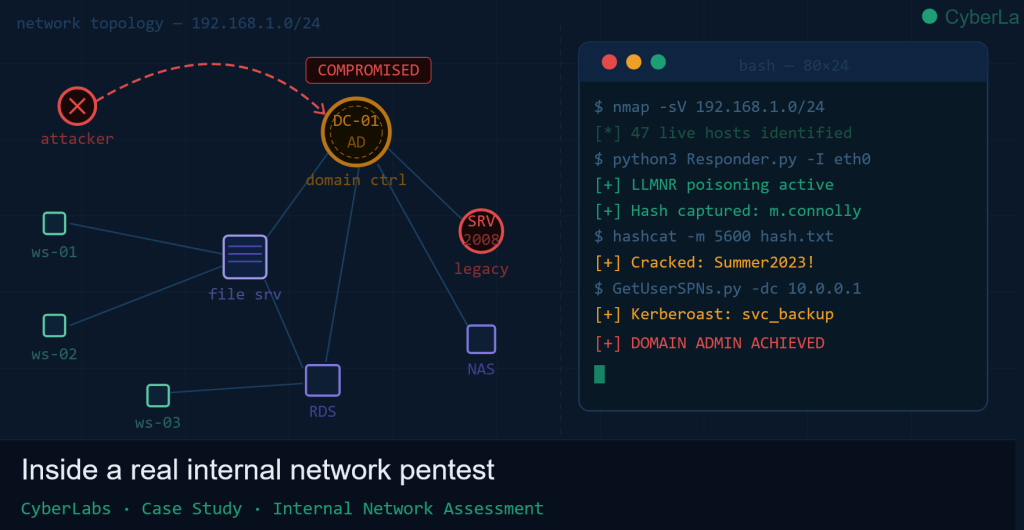
Testing began with a network sweep to map the internal environment. Using Nmap, we identified 47 live hosts across the two subnets, including:
- 1 Domain Controller (Windows Server 2016)
- 2 member servers (file server and remote desktop services host)
- 1 legacy Windows Server 2008 R2 machine still in production use
- 42 Windows 10/11 workstations
- 1 NAS device (QNAP)
The presence of the Windows Server 2008 R2 machine was immediately notable — Microsoft ended extended support for this platform in January 2020, meaning it receives no security patches.
SMB signing was found to be disabled across the majority of workstations, and LLMNR (Link-Local Multicast Name Resolution) and NBT-NS were both active on the network — a common default configuration that carries significant risk, as we would demonstrate shortly.
Phase 2 — Enumeration
With the network mapped, we moved to deeper enumeration of the Active Directory environment using a combination of tools including BloodHound, ldapdomaindump, and CrackMapExec.
BloodHound, which visualises Active Directory trust paths and attack routes, revealed several concerning configurations:
- A service account (
svc_backup) had been granted Domain Admin privileges — a common over-permissioning pattern where convenience trumps security - 37 user accounts had not changed their passwords in over 18 months, with no enforced expiry policy
- Several users were members of the built-in local Administrators group on workstations they did not administer
- Group Policy Preferences (GPP) files were present in SYSVOL — an older mechanism sometimes used to deploy local administrator passwords, which are stored in an encrypted but trivially reversible format
Enumeration of SMB shares on the file server also revealed that the top-level \\FILESERVER\General share was readable by all authenticated domain users, including a folder titled HR Documents containing staff salary information and personal data.
Phase 3 — Exploitation
Finding 1 — LLMNR/NBT-NS Poisoning (Critical)
With LLMNR enabled across the network, we deployed Responder — a tool that listens for LLMNR and NBT-NS broadcast queries and responds to them, tricking machines into sending their credentials to our system.
Within 11 minutes of running Responder, a workstation belonging to a fee earner (domain\m.connolly) attempted to resolve a non-existent network path. Responder intercepted the request and captured the user’s NTLMv2 challenge-response hash.
The captured hash was then submitted to Hashcat with a common wordlist. The password — Summer2023! — was cracked in under 4 minutes. This is an extremely common pattern: a complex-looking password that meets policy requirements (uppercase, number, special character) but is based on a predictable word-season-year structure that appears in every major password cracking list.
We now had valid domain credentials.
Finding 2 — Credentials Exposed in SYSVOL (Critical)
Using our domain credentials, we accessed the SYSVOL share on the Domain Controller and located a Group Policy Preferences XML file containing a local administrator password. The cPassword field, while AES-256 encrypted by Microsoft, uses a static key that Microsoft published in 2012. A single command with gpp-decrypt revealed the plaintext password in seconds.
This gave us local administrator access to any machine where this GPP policy had been applied — in this case, all 42 workstations.
Finding 3 — EternalBlue on Legacy Server (Critical)
The Windows Server 2008 R2 machine was found to be unpatched against MS17-010, commonly known as EternalBlue — the vulnerability exploited in the 2017 WannaCry ransomware outbreak. Despite being public knowledge for over seven years, this server had never been patched or isolated.
Using Metasploit, we exploited the vulnerability and obtained a SYSTEM-level shell on the server within minutes, with no credentials required. This server was found to hold archived client matter files going back to 2011.
Finding 4 — Kerberoasting (High)
Using the domain credentials obtained in Finding 1, we performed a Kerberoasting attack — a technique that requests Kerberos service tickets for service accounts and attempts to crack them offline. Because service accounts often have long-standing, manually set passwords that predate modern password policies, they are frequently vulnerable.
We identified two Kerberoastable accounts, including the over-privileged svc_backup account identified during enumeration. The password for svc_backup — Backup@2019 — was cracked offline in under two hours, granting us Domain Admin access.
At this point, the engagement’s primary objective had been achieved. A real attacker with Domain Admin access owns the entire Active Directory environment: every user account, every server, every workstation, every file.
Phase 4 — Post-Exploitation & Impact Demonstration
To illustrate the real-world impact without accessing client data, we demonstrated the following with Domain Admin privileges:
- Credential dumping — we extracted all password hashes from the Domain Controller using
secretsdump.py, including the KRBTGT account hash. Possession of this hash allows an attacker to forge Kerberos tickets indefinitely — known as a Golden Ticket attack — providing persistent, undetectable access even after a password reset - Shadow copy access — we accessed Volume Shadow Copies on the file server, demonstrating that deleted or overwritten files could be recovered by an attacker
- Email access — using credentials obtained, we confirmed access to Microsoft 365 mailboxes via Exchange Online, noting that MFA was not enforced for all users
The firm’s entire network, client data, internal communications, and cloud environment were accessible from a starting point of a single user clicking on a rogue network path — a scenario that can occur simply by mistyping a server name.
Findings Summary
All findings were assigned a risk rating based on their likelihood of exploitation and potential business impact, using a framework aligned with the CVSS v3.1 scoring system.
| Ref | Finding | Risk Rating | MITRE ATT&CK Technique |
|---|---|---|---|
| INT-01 | LLMNR/NBT-NS Poisoning enabling credential capture | 🔴 Critical | T1557.001 — LLMNR/NBT-NS Poisoning |
| INT-02 | Credentials exposed in SYSVOL via Group Policy Preferences | 🔴 Critical | T1552.006 — Group Policy Preferences |
| INT-03 | Unpatched MS17-010 (EternalBlue) on legacy server | 🔴 Critical | T1210 — Exploitation of Remote Services |
| INT-04 | Kerberoastable service account with Domain Admin rights | 🟠 High | T1558.003 — Kerberoasting |
| INT-05 | Weak and predictable password policy (no expiry, common patterns) | 🟠 High | T1110.002 — Password Cracking |
| INT-06 | Sensitive HR data accessible to all authenticated users via open SMB share | 🟠 High | T1039 — Data from Network Shared Drive |
| INT-07 | SMB signing disabled — enables relay attacks | 🟡 Medium | T1557.001 — Adversary-in-the-Middle |
| INT-08 | MFA not enforced for all Microsoft 365 users | 🟡 Medium | T1078 — Valid Accounts |
| INT-09 | Excessive local administrator rights on workstations | 🟡 Medium | T1078.003 — Local Accounts |
| INT-10 | No network segmentation between workstations and servers | 🟡 Medium | T1021 — Remote Services |
| INT-11 | QNAP NAS running outdated firmware with known CVEs | 🟢 Low | T1190 — Exploit Public-Facing Application |
| INT-12 | No centralised logging or SIEM — attack activity not detectable | 🟢 Low | T1562.002 — Disable Windows Event Logging |
Remediation Recommendations
CyberLabs provided O’Brien & Associates with a detailed remediation report prioritised by risk rating. The immediate actions recommended were:
Immediate (within 72 hours)
- Disable LLMNR and NBT-NS via Group Policy — this eliminates the attack vector used in Finding INT-01 entirely and takes minutes to deploy
- Decommission or isolate the Windows Server 2008 R2 machine — patch it if possible, or place it behind a strict firewall rule that prevents any inbound SMB access until it can be replaced
- Remove the GPP password from SYSVOL and rotate the affected local administrator password using LAPS (Local Administrator Password Solution), which generates unique, automatically rotating passwords per machine
- Reset the
svc_backupaccount password to a 30+ character random string and remove its Domain Admin membership, replacing it with only the specific permissions required for its backup function
Short Term (within 30 days)
- Enforce MFA for all Microsoft 365 accounts via Conditional Access policies — this is one of the single highest-impact security controls available and can be implemented at no additional licensing cost on most tenants
- Enable SMB signing on all domain members via Group Policy
- Restrict the General SMB share and implement role-based access control — HR data should only be accessible to HR staff
- Implement a password policy that enforces a minimum length of 14 characters and bans commonly used patterns — consider deploying a banned password list via Azure AD Password Protection
Medium Term (30–90 days)
- Deploy network segmentation — workstations and servers should be on separate VLANs with firewall rules controlling traffic between them. This significantly limits an attacker’s ability to move laterally
- Implement centralised logging — Windows Event Forwarding and a SIEM or log aggregation platform will enable detection of credential attacks, lateral movement, and privilege escalation in real time
- Update NAS firmware and review QNAP device for known CVEs
- Conduct user awareness training — particularly around password hygiene and phishing
Outcome
O’Brien & Associates engaged CyberLabs for a remediation review six weeks after the initial report. The three critical findings had been resolved: LLMNR/NBT-NS was disabled network-wide, the legacy server had been decommissioned and its workload migrated, LAPS had been deployed to all workstations, and MFA had been enforced for all 52 Microsoft 365 accounts.
On the follow-up test, none of the critical or high-severity findings from the original engagement were reproducible.
The managing partner noted that prior to the engagement they had assumed their IT environment was “reasonably secure” because they had antivirus installed and no prior incidents. The test demonstrated that the absence of visible incidents does not mean the absence of risk — only that an attacker had not yet arrived, or had not yet been detected.
What Does an Internal Network Pentest Cost?
Every engagement is scoped based on the size of the environment, the number of hosts, and the objectives of the test. For a firm the size of O’Brien & Associates, an internal network penetration test typically takes four to six days of testing time, with a further two to three days for reporting and documentation.
CyberLabs provides a fixed-fee quote following an initial scoping call — there are no hidden costs and no hourly rate overruns.
If you’d like to understand what your internal network exposure looks like, get in touch to request a consultation. The first conversation is always free.
CyberLabs is a Dublin-based penetration testing and offensive security firm. We help Irish organisations identify and fix security vulnerabilities before attackers can exploit them. All testing is conducted under signed rules of engagement and in full compliance with Irish and EU law.